File the withholdings and give the certificate
Here you prepare the monthly withholding statement and each supplier's certificate.
How to
- Open Tax > Tax tracker, « Withholding taxes » tab.
- In « Monthly withholding statement », pick the month.
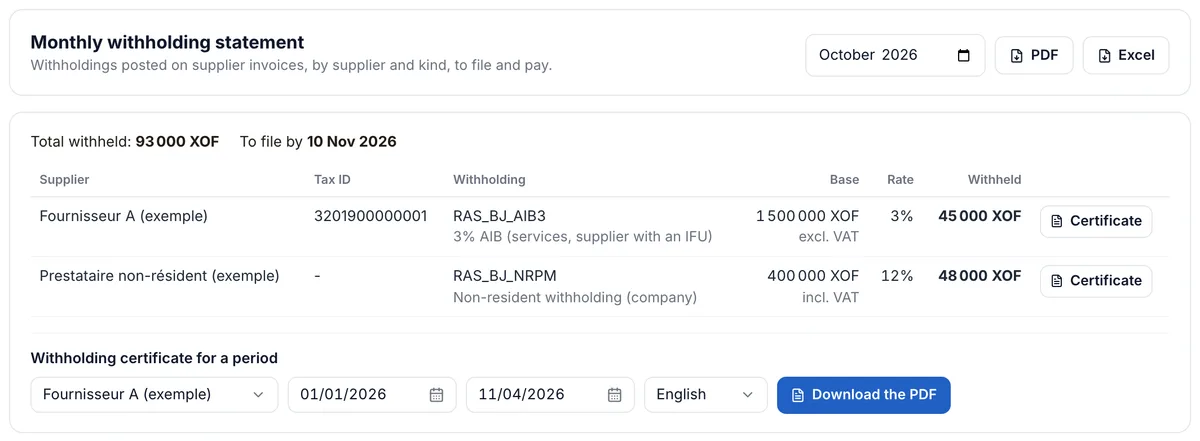
- Check the « Total withheld » and the « To file by » date.
- Click « PDF » or « Excel » for the statement.
- On the supplier's line, click « Certificate ».
Learn more
The statement lists, by supplier and kind of withholding, the base, the rate and the amount withheld on the month's posted invoices. It is checked against the 447 accounts: a difference shows when entries were typed by hand on those accounts. The certificate, in French or English, lists the withholdings made on one supplier.
Filing dates
The 10th of the next month in Benin, the 15th in Côte d'Ivoire, Gabon and Senegal. In Gabon, the précompte on rent is filed quarterly. Large and medium companies in Côte d'Ivoire have the 10th, 15th or 20th depending on their sector.
A certificate for a period
Under the table, « Withholding certificate for a period »: pick the supplier, the dates and the language, then « Download the PDF ». For example the whole year for Fournisseur A (exemple), who credits it against its taxes.