Apply withholding at source on supplier invoices
Here you turn on withholding at source and apply it to each supplier invoice.
How to
- Open Book settings > Withholding at source.
- Tick « Compute withholding at source on supplier invoices ».
- Pick « The book's tax regime », then click « Save ».
- In Suppliers, « Tax profile » column, complete the « Supplier's tax profile ».
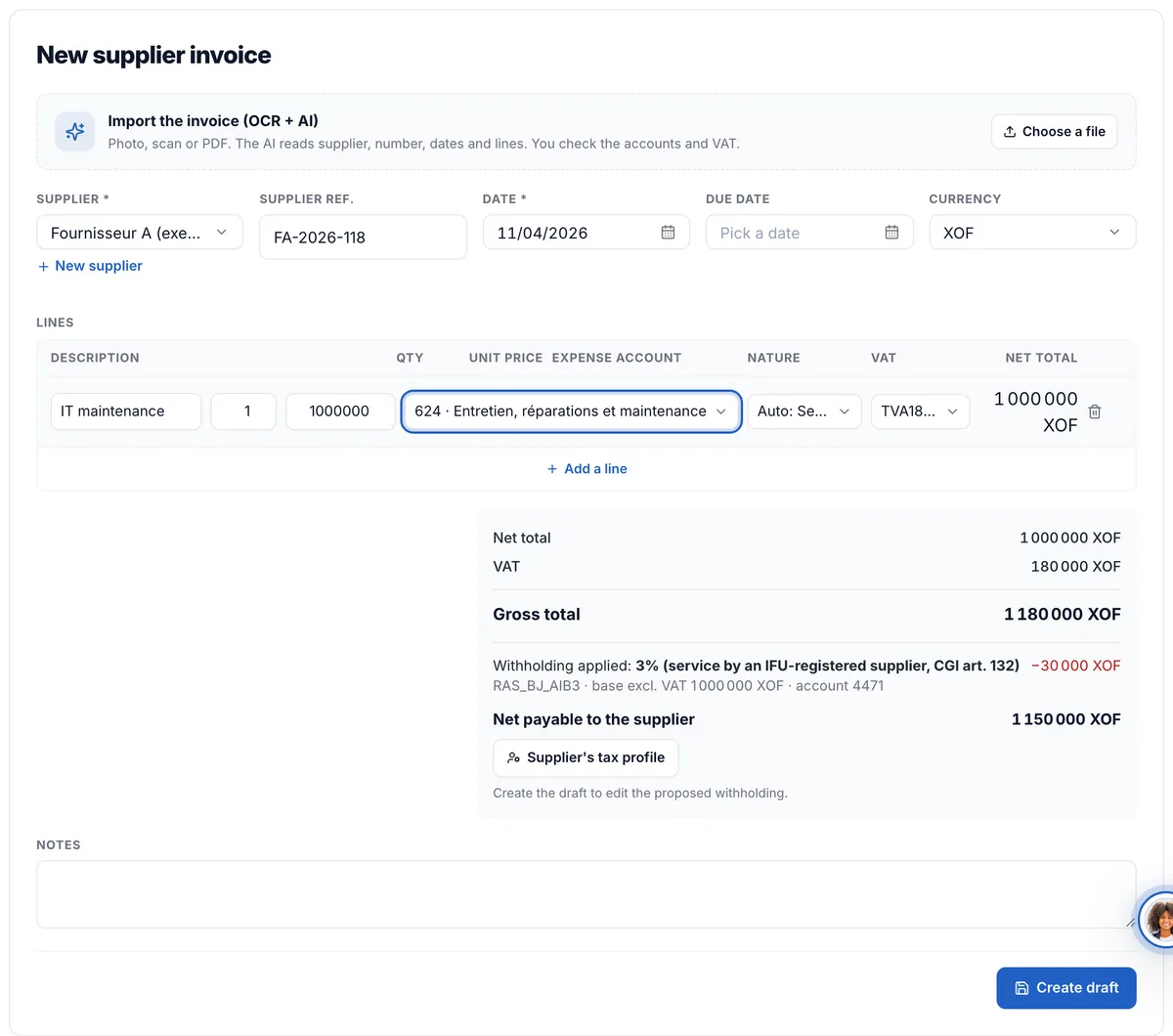
- Enter the supplier invoice: under the totals, read « Withholding applied » and the « Net payable to the supplier ».
- Click « Record in the books ».
Learn more
Comptia proposes the withholding due from the book's country, the supplier's profile, the nature of each line and the invoice date. It is credited to account 447 (taxes withheld at source) and the supplier, on 401, receives the net: a payment or a payment run pays the net. Withholding is available for Côte d'Ivoire, Benin, Gabon and Senegal.
The rules by country
Benin: AIB 1% on works and 3% on services by a supplier with an IFU, 5% without an IFU, IRF 12% on rent paid to an individual. Côte d'Ivoire: 2% on TEE or micro-enterprise providers, 7.5% on professional fees, 12% or 15% on rent, 20% on non-residents. Gabon: 9.5% précompte on a provider not registered for VAT, 10% on rent, 25% on non-residents. Senegal: 5% (BRS) from 25,000, 5% on rent from 150,000 a month, 20% on non-residents, VAT précompte for designated buyers. Each rule shows its legal source in « Rules applied ». AIRSI (Côte d'Ivoire) is collected by the seller on its sales: it is not a supplier withholding.
The supplier's tax profile
« Tax residency », « Form » (individual or company), « Tax regime », « VAT registered » and « Tax ID (IFU, NCC, NIF, NINEA) ». Without a tax ID, the supplier is treated as not registered. An « Exemption certificate (no.) » with its « Valid until » date stops the withholdings that accept one until that date. When a field is missing, Comptia does not guess: the invoice shows what to complete.
The invoice entry
Example in Benin, a service of 1,000,000 excl. VAT with 18% VAT: debit 624 for 1,000,000, debit 4452 for 180,000, credit 4471 for 30,000 (AIB 3%), credit 401 for 1,150,000. Each line's « Nature » column (Goods, Services, Fees, Rent, Works) comes from the expense account; change it if it does not fit. An invoice from the invoice inbox posts the same way.
Change an invoice's withholding
On a draft, « Edit the withholding » replaces the computation: choose the code, the base and the rate, and give the « Reason (required) », recorded in the audit log. « Back to the automatic computation » cancels it. An invoice already posted can no longer be changed: reverse its entry.
Customize a rule
In « Rules applied », « Customize » changes the rate, the account (447 only) or turns the rule off. « Applies to »: « This book », or « Every book of the firm (default) ». « From » sets the effective date: earlier documents keep the previous rule. « Reset to the official rate » goes back to the official rule. Each change shows in the rule's « History ».
Frequently asked questions
A few rates are not confirmed by an official source (in Benin, non-residents and rent paid to a company). Set the rate with « Customize », or enter the withholding by hand with its reason.